Stepping motor S-Curve Motion Profile Based on Arduino UNO
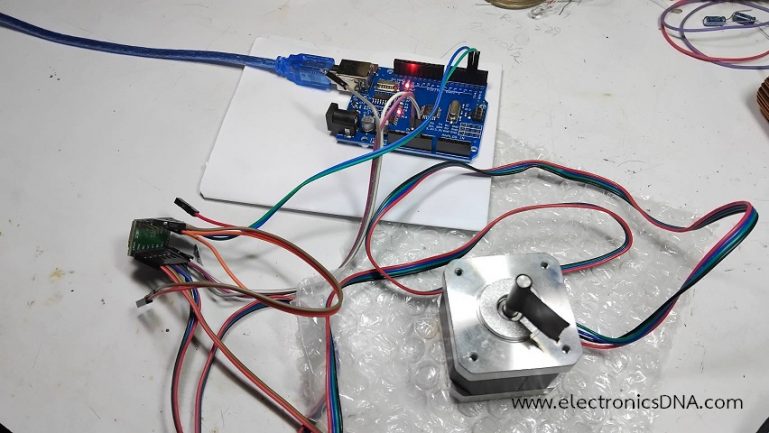
โครงงานการทดลองนี้เป็นเนื้อหาต่อสำหรับการควบคุมมอเตอร์ให้เคลื่อนที่แบบ S-Curve Motion Profile ด้วยบอร์ดควบคุม Arduino UNO ให้กับมอเตอร์แบบสเต็ปปิ้ง (Stepping Motor) ร่วมกับโมดูลขับมอเตอร์เบอร์ A4988 โดยรูปแบบการขับมอเตอร์แบบสเต็ปปิ้งมอเตอร์นั้น จะแตกต่างจากเซอร์โวมอเตอร์ (Servo Motor) และมอเตอร์กระแสตรง (DC Motor) ในบางส่วน ทั้งนี้ในการทดลองเพื่อเป็นความรู้เบื้องต้นและแนวทางในการนำไปประยุกต์ใช้งานต่างๆ ต่อไป
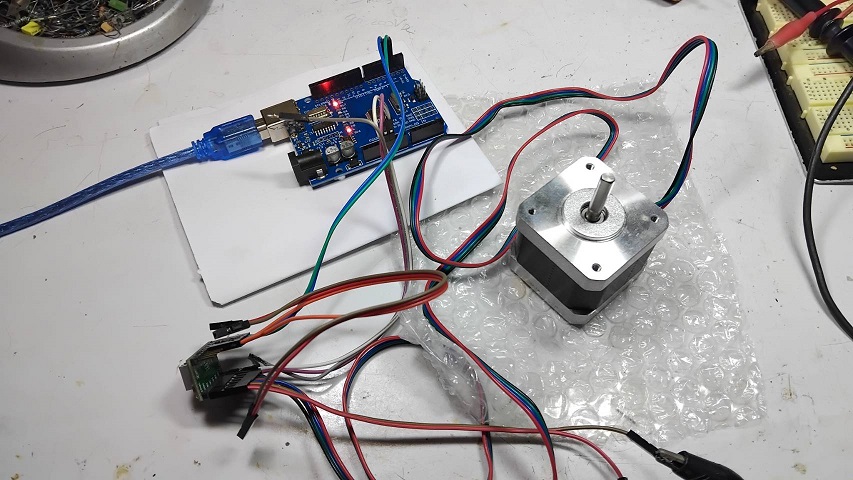
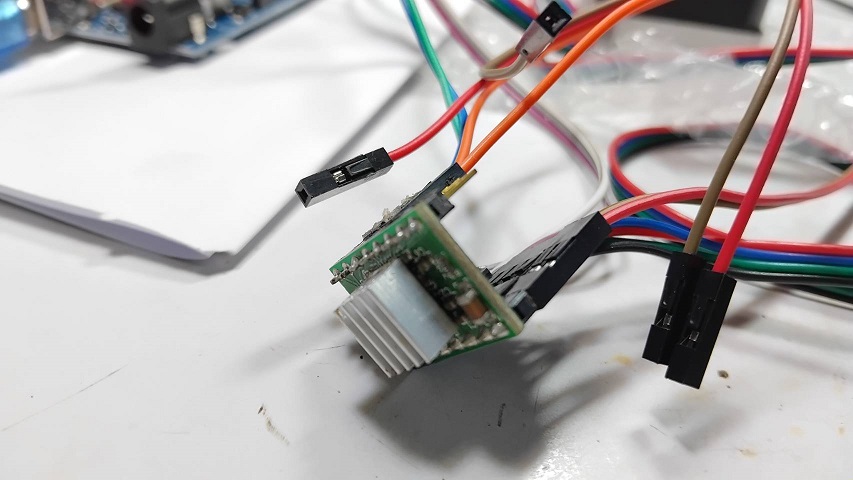
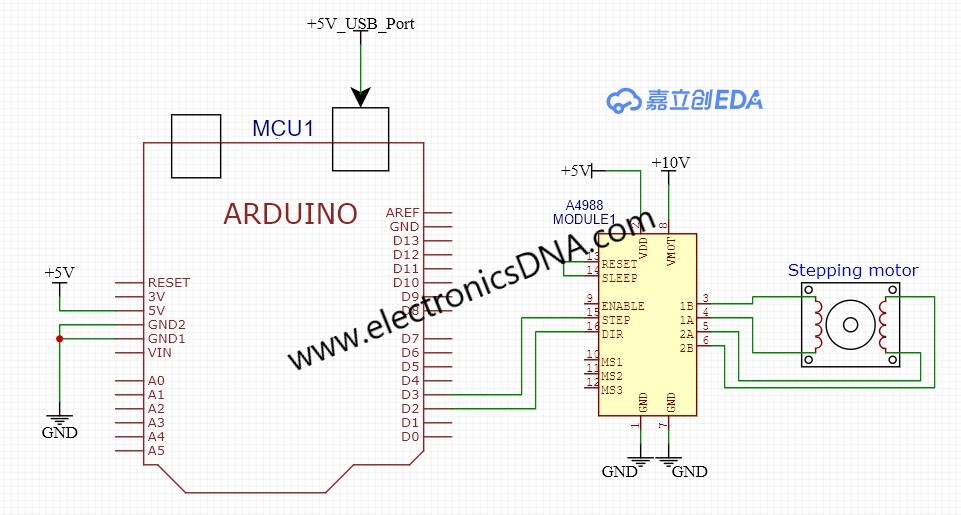
ในรูปที่ 1 และรูปที่ 2 แสดงการต่ออุปกรณ์ต่างๆ สำหรับทดลองการเคลื่อนที่แบบ S-Curve Motion Profile ด้วยบอร์ดควบคุม Arduino UNO และสเต็ปปิ้งมอเตอร์ (Stepping Motor) โดยในรูปที่ 2 แสดงบอร์ดโมดูล A4988 สำหรับใช้ขับสเต็ปปิ้งมอเตอร์ที่ใช้งาน
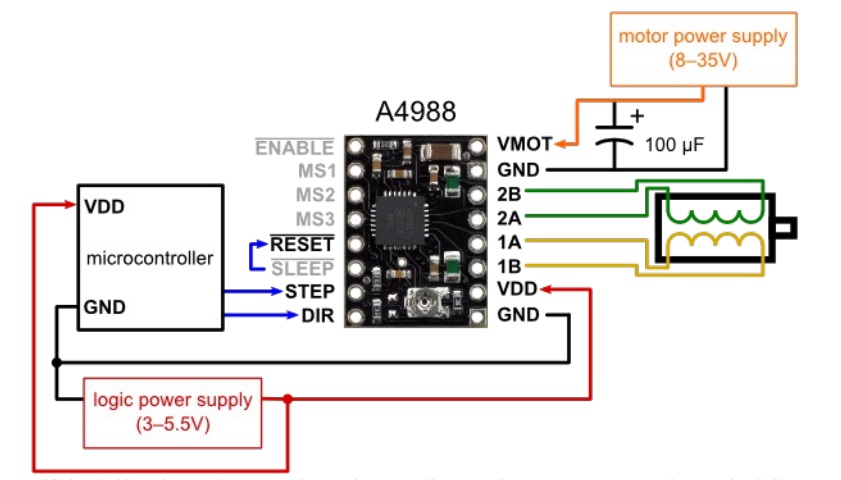
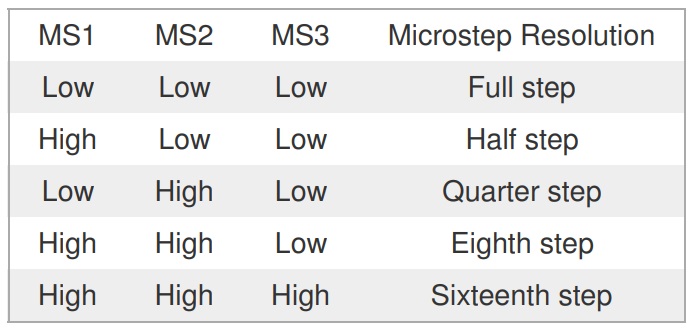
รูปที่ 3 และรูปที่ 4 แสดงลักณะการต่อใช้งานโมดูล A4988 รวมกับบอร์ดควบคุมไมโครคอนโทรลเลอร์ต่างๆ ซึ่งจะต้องมีแหล่งจ่ายไฟเลี้ยง 2 ส่วนคือ ส่วนแรกที่ขา VDD และ GND ขนาด 3V-5V ส่วนที่สองตำแหน่งขา VMOT และ GND ขนาด 8V-35V ส่วนในรูปที่ 4 แสดงตารางการกำหนดความละเอียดในการหมุนของตัวมอเตอร์ที่ขา MS1, MS2 และ MS3 ตามลำดับ [รายละเอียดการใช้โมดูล A4988 คลิกที่นี่]
// Arduino Code This is a highly simplified conceptual example.
// A full, working S-curve requires a pre-calculated table or timer interrupt logic.

#define STEP_PIN 3
#define DIR_PIN 2
#define STEPS_PER_REVOLUTION 1600 // Example: NEMA 17 in 1/8 microstepping (200 * 8)

void setup() {
  Serial.begin(9600);
  pinMode(STEP_PIN, OUTPUT);
  pinMode(DIR_PIN, OUTPUT);
  // Set A4988 Microstepping Pins (MS1, MS2, MS3) if needed
  // ...
  digitalWrite(DIR_PIN, HIGH); // Set direction
}

void S_Curve_Move(long totalSteps, float maxSpeed_steps_sec, long accelTime_ms) {

  long numAccelSteps = totalSteps / 3; // Simplified split: Accel/Cruise/Decel phases

  // --- Acceleration Phase (Pulse Delay Calculation) ---
  // In a real S-Curve, you'd use a lookup table (an array) of pre-calculated delays
  // or use a smooth function of velocity (like a cubic curve) to determine 'dly' for each step.

  // Example: Rough exponential/sine-like delay decrease (speed increase)
  for (long i = 0; i < numAccelSteps; i++) {
    // dly will decrease smoothly from a large value (slow) to a small value (fast)
    // The actual S-curve function is applied here, e.g., using sin() or a polynomial.
    // long dly = (long)(initial_delay_us - (i * (initial_delay_us - min_delay_us) / numAccelSteps));

    // Placeholder for S-Curve logic result
    long dly = (long)(5000 - (i * 4500.0 / numAccelSteps));
    if (dly < 500) dly = 500; // Minimum delay (Max Speed)

    digitalWrite(STEP_PIN, HIGH);
    delayMicroseconds(dly / 2); // Pulse width
    digitalWrite(STEP_PIN, LOW);
    delayMicroseconds(dly / 2); // Time until next pulse
  }

  // --- Cruise Phase ---
  // Simple constant speed (minimum delay 'min_delay_us')
  // ...

  // --- Deceleration Phase ---
  // Same as acceleration, but with delay increasing (speed decreasing)
  // ...
}

void loop() {
  // Move 10 revolutions (16000 microsteps) with a 500ms accel/decel time
  S_Curve_Move(16000, 4000.0, 500);
  delay(2000);
  // Change direction and move back
  // ...
  digitalWrite(DIR_PIN, LOW); // Set direction

  S_Curve_Move(16000, 4000.0, 500);
  delay(2000);
  digitalWrite(DIR_PIN, HIGH); // Set direction
}
สำหรับโปรแกรมในการควบคุมสเต็ปปื้งมอเตอร์แบบ S-Curve Motion Profile ที่แสดงข้างบนนั้น จะเป็นตัวอย่างโค้ดการควบคุมแบบเบื้องต้น ซึ่งสามารถนำไปปรับปรุงแก้ไขได้ตามเหมาะสม โดยตัวโปรแกรมจะแบ่งออกเป็น 4 ส่วนคือ ส่วนแรกจะเป็นการประกาศตัวแปรการใช้งานขา D2 และ D3 ของบอร์ดควบคุม Arduino UNO กับโมดูลขับมอเตอร์ A4988 (ดูในรูปที่ 5 ประกอบ) ส่วนที่สองเป็นฟังก์ชั่น void setup() สำหรับกำหนดอัตราการสื่อสารที่ความเร็ว 9600, กำหนดขาใช้งาน D2 และ D3 ให้เป็นเอาต์พุตและกำหนดทิศทางการหมุนเริ่มต้นด้วยคำสั่ง digitalWrite(DIR_PIN, HIGH) ต่อมาส่วนที่สาม เป็นคำสั่งฟังก์ชั่น void S_Curve_Move(long totalSteps, float maxSpeed_steps_sec, long accelTime_ms) เพื่อควบคุมให้มอเตอร์เคลื่อนที่แบบ S-Curve Motion Profile ในสมการ long dly = (long)(5000 – (i * 4500.0 / numAccelSteps)); ผ่านตัวแปรทั้ง 3 ภายในฟังก์ชั่น สุดท้ายส่วนที่สี่เป็นฟังก์ชั่น void loop() จะทำหน้าที่ส่งค่าตัวแปรทั้ง 3 ตัว เพื่อควบคุมการเคลื่อนที่ด้วยคำสั่ง S_Curve_Move(16000, 4000.0, 500); ไปยังฟังก์ชั่นส่วนที่สาม (ตามที่อธิบายข้างต้น) นอกจากนี้ยังใช้คำสั่ง digitalWrite(DIR_PIN, LOW); และ digitalWrite(DIR_PIN, HIGH); เพื่อเปลี่ยนทิศทางการหมุนให้กับสเต็ปปิ้งมอเตอร์
สำหรับโครงงานการทดลองควบคุมมอเตอร์ให้เคลื่อนที่แบบ S-Curve Motion Profile ด้วยบอร์ดควบคุม Arduino UNO ให้กับมอเตอร์แบบสเต็ปปิ้ง (Stepping Motor) โดยใช้โมดูลขับมอเตอร์เบอร์ A4988 ในครั้งนี้ สำหรับเป็นแนวทางเบื้องต้นในเรื่องของ การต่อวงจรใช้งานตัวมอเตอร์ โมดูลขับมอเตอร์ A4988 และบอร์ด Arduino รวมทั้งโค้ดโปรแกรม Arduino เพื่อควบคุมการเคลื่อนที่แบบ S-Curve Motion Profile ให้กับมอเตอร์ ในส่วนรายละเอียดเพิ่มสามารถเข้าไปตามลิ้งเว็บไซต์อ้างอิงข้างล่างนี้ครับ
Reference
- https://www.tme.eu/Document/25459777e672c305e474897eef284f74/POLOLU-2128.pdf
- https://www.handsontec.com/dataspecs/module/A4988.pdf
- https://electronics.stackexchange.com/questions/38573/smooth-a-motor-movement
- https://forum.arduino.cc/t/stepper-motor-s-curve/465667
- https://wokwi.com/projects/387721175033470977
- https://www.littlechip.co.nz/blog/a-simple-stepper-motor-control-algorithm
- https://www.solomotorcontrollers.com/blog/motion-planning-servo-drives
- https://fightpc.blogspot.com/2018/04/testing-sinusoidal-s-curves.html
- https://www.motioncontroltips.com/what-is-a-motion-profile/
- https://fightpc.blogspot.com/2018/04/how-to-get-sinusoidal-s-curve-for.html?m=1
- https://twasp.info/public/paper/33.%20683-695%20%20B%20Article%20final.pdf
- https://www.mouser.com/blog/understand-motion-trajectory-profiles-effective-motor-control
- https://forum.arduino.cc/t/some-math-questions-acceleration-curves/50918/4
- https://forum.arduino.cc/t/s-curve-for-easydriver-v3-stepper-motor-driver/22749
- https://www.mdpi.com/1424-8220/23/6/3074
